Run your screen saver as wallpaper
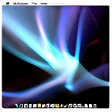
Ever thought that your screensaver would look really cool as your wallpaper? With Wallsaver this dream is now a reality.
The simple little application activates the change at the click of a button, and you can immediately enjoy your screensaver on your desktop.
If you'd like to change screensaver, you don't even have to go in your System Preferences. Just change it directly from the program's preferences.
If you are tired of seeing your screensaver on your desktop just restore your original wallpaper.
Wallsaver is easy to use and does not particularly use up a lot of RAM.
We did notice some text to still be in French in the application window, and it would be nice to have that translated to English for non-French speaking users.
Added "Wallsaver Information" under Help menuAdded new graphical disk imageMoved "Extras" menu to left of Help menuScaled down application icon
Changes
Added "Wallsaver Information" under Help menuAdded new graphical disk imageMoved "Extras" menu to left of Help menuScaled down application icon

























User reviews about Wallsaver
by Nick Mead
@Lion.
I've checked the developer site but no update for Lion has been issued yet :( Will keep an eye on it.
Pros: -
Cons: -
by Anonymous
Does not work properly in lion.
In lion, it starts off ok, but soon as you shift to another desktop or a fullscreen application, well it messes up. More
by Anonymous
dammmmmmm.
dl the app now desktop and screen saver dont work $&#$%#$^%*&^ mad about it sooooooo mad about this i have some good screen savers saved too
Cons:
bad bad bad More